
Captcha - Proof of Work
Joomla 6.1 has a built-in CAPTCHA that works without a Google account, without an API key and without sending anything to an external server. The plugin is called CAPTCHA - Proof of Work and is available immediately after installing Joomla 6.1. This article explains what it is, how to activate it and what you need to check afterwards.
What is POW Captcha?
POW stands for Proof of Work. Instead of asking the visitor to click on traffic lights or zebra crossings or to retype text, it asks the visitor’s browser to solve a small maths problem. This takes a normal browser around 100 to 500 milliseconds, and the visitor doesn’t even notice.
For a spambot that wants to submit the same form thousands of times an hour, however, that computational cost adds up to a very high burden. Spam is a matter of economics: if every submission attempt costs processing time, mass spam becomes unviable.
The captcha is built on the open-source library Altcha, developed by BAU Software from the Czech Republic. The plugin is MIT-licensed and is fully integrated into the Joomla core. No external service is involved.
Enabling POW Captcha in Joomla 6.1
The setup consists of two mandatory steps and two checks that you then carry out.
Step 1: Enable the plugin
- In the admin panel, go to Extensions > Plugins.
- Search for
captcha - Open the CAPTCHA - Proof of Work plugin.
- Set Status to Enabled.
- Save by clicking Save & Close.
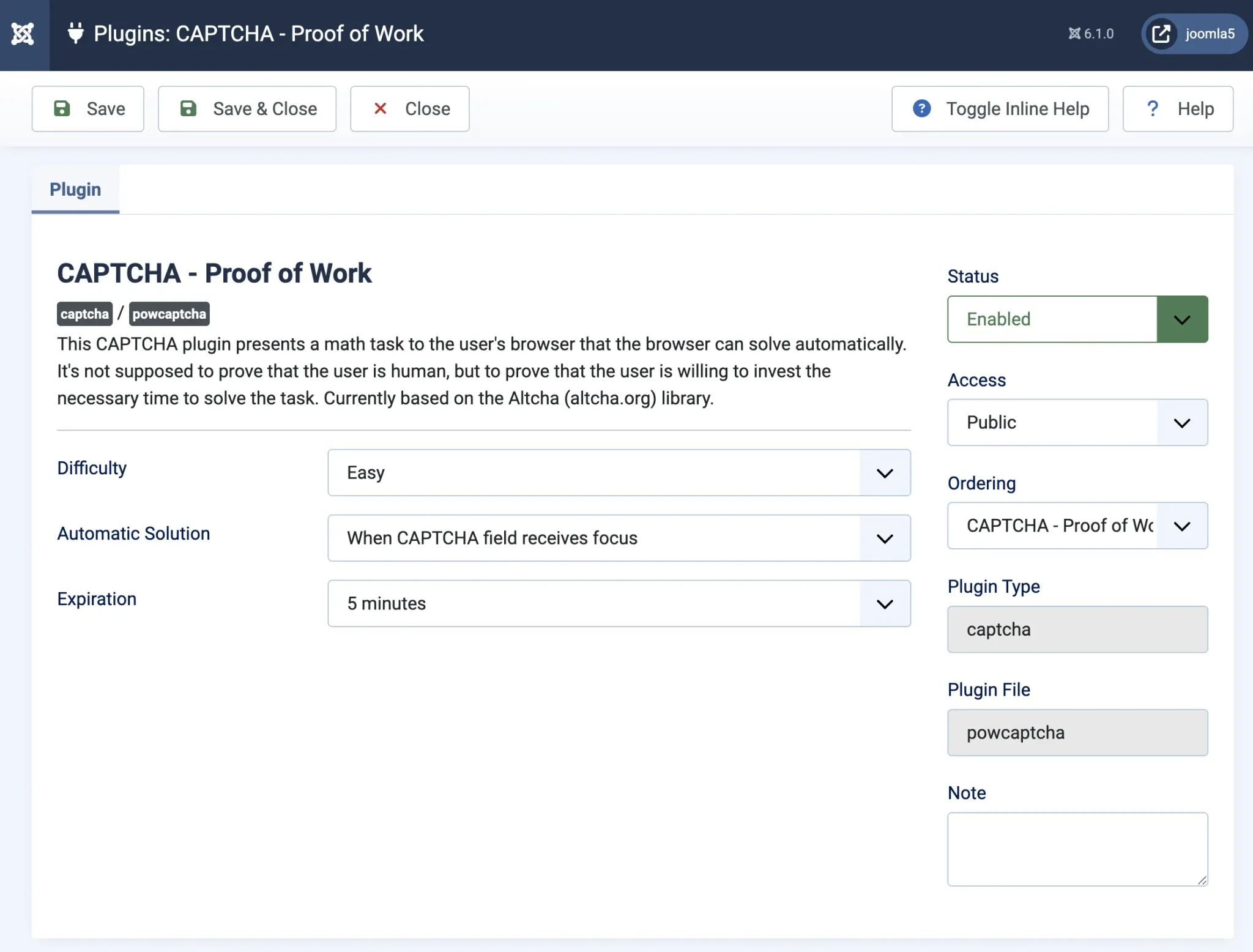
During this step, you will see three settings you can choose from:
Difficulty Level
Choose from Easy, Medium or Hard. Easy is suitable for a standard contact form. Hard increases the computational cost per submission, which can be useful for forms that are frequently abused, such as user registration. Only change this if you are actually experiencing spam.
Automatic solution
This determines when the browser starts the puzzle. The default setting "When CAPTCHA field receives focus" is suitable for most situations. "On submit" adds a short delay when the form is submitted. "On page load" starts as early as possible, but also makes the browser perform calculations even if the visitor never fills in the form.
Expiry
time How long the solved puzzle remains valid after it has been solved. The default value of five minutes is sufficient for almost any contact form. If you have a multi-step form that takes the visitor longer to complete, set the expiry time to a longer duration.
Step 2: Set as default captcha
- Go to System > General settings
- Open the Website tab.
- Find the Default CAPTCHA field.
- Select CAPTCHA - Proof of work.
- Save.

From now on, all forms in Joomla that use the built-in captcha link will automatically use the proof-of-work captcha. These include the contact form, user registration and the password reset page.
Step 3: check that it works
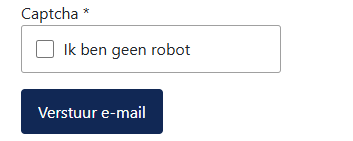
Open your website’s contact form in an incognito browser window and submit a test message. The submission should proceed as normal without you having to click or fill in anything. Do you still see a Google reCAPTCHA widget? If so, it is hard-coded into the template or an external extension.
Step 4: Disable Google reCAPTCHA
If you previously used Google reCAPTCHA and POW Captcha is now the default, do the following:
- Go to Extensions > Plugins.
- Search for CAPTCHA - reCAPTCHA.
- Disable the plugin.
- Remove the site key and secret key from the plugin configuration.
Keys you no longer use do not belong in the database.
How does it work technically?
When the web page containing a form is loaded, the Joomla server stores a mathematical challenge in the database: a random number, a salt and a target value. The visitor’s browser then attempts to find a number whose hash value (a sort of fingerprint) falls below the target value. Once the browser has found that number, it sends it along with the form submission.
The server then checks three things: is the mathematical solution correct, has the expiry time not yet passed, and has the solution not been used before? Only when everything is in order is the form processed. The challenge is then removed from the database so that no one can use the same solution twice.
This means that the captcha is stateful: every form view writes a row to the database and every submission deletes that row. For a standard website, this is negligible. On a page with many registrations per hour, it is worth keeping an eye on this.
GDPR and privacy legislation
The French data protection authority CNIL has ruled that Google reCAPTCHA processes visitor data that goes beyond what is strictly necessary for spam protection. Two companies were fined, partly for using reCAPTCHA without prior consent. The German regulators have held a similar view for years.
POW Captcha does not send any data to third parties. There is no request to Google or any other service, no browser fingerprinting and no captcha cookie. Visitor data does not leave your own server. For websites that receive visitors from the EU, this is a significant difference.
Please note: if your privacy policy states that you use Google reCAPTCHA for spam protection, please remove or amend that sentence after you have switched.
Accessibility
Traditional captchas have been a stumbling block for people with visual impairments, motor disorders or cognitive disabilities for decades. The W3C published a paper on this as early as 2005, and the problem has not been resolved since.
POW Captcha is completely invisible to the visitor. There is no image to recognise, no audio to listen to and no button to click. The browser does the work in the background. Altcha, the underlying library, complies with WCAG 2.2 Level AA and the European Accessibility Act 2025.
Current limitation: no variable difficulty level
A known limitation of the current implementation is that the difficulty level is fixed. Altcha natively supports the ability to automatically increase the difficulty level for visitors who submit the form repeatedly: Easy the first time, Hard the tenth time in ten minutes, and so on. This makes targeted spam campaigns increasingly costly.
Joomla 6.1 does not yet do this, as it requires a rate-limiting system in the core that is not yet included. Harald Leithner is leading a proposal for such a system, intended for Joomla 7.x. There is no concrete delivery date as yet.
Practical advice until then: if a specific form receives a lot of spam, set the difficulty level to Hard across the board. This adds an extra second or two for every visitor, but stops most automated attacks. For persistent problems, additional security at server or firewall level is a better solution.
Common mistakes
reCAPTCHA is hard-coded into a template
Some Joomla templates place a reCAPTCHA widget directly into the form code, independently of the Joomla captcha setting. Changing the default captcha in Global Configuration has no effect on this. You will then need to modify the template code or switch to a template that uses the Joomla captcha integration.
External form builders with their own captcha settings
Extensions such as ChronoForms, Convert Forms, RSForm!Pro and Fabrik have their own captcha settings for each form, which you must adjust manually. Some extensions do not work with the Joomla standards, making it impossible to use this captcha. Please contact the developer for more information.
Page cache active on form pages
If a form page is cached, the captcha challenge is included in the cached HTML. Every visitor will then receive the same challenge, which does not work and also poses a security risk. Check whether your caching solution excludes form pages. Most Joomla caching solutions do this by default.
Two captcha plugins active
at the same time A website that has both reCAPTCHA and POW Captcha active performs duplicate work with every form submission. Disable reCAPTCHA if POW Captcha is the new standard.
Frequently asked questions
Does POW Captcha also work on my contact form?
Yes, if you use Joomla’s own contact component. Other forms also work, provided the extension uses the Joomla captcha integration.
Do I need to create an account or register?
No. The plugin works entirely without registration, an API key or an external service.
Will the visitor notice anything?
Not usually. The browser solves the puzzle in the background. No checkbox, image or other question appears.
Is POW Captcha available in Joomla 4/5?
No. The plugin plg_captcha_powcaptcha is only available in Joomla 6.1 and later.
What happens if the browser has JavaScript disabled?
The puzzle is solved using JavaScript. Without JavaScript, the captcha does not work. For the vast majority of visitors, this is not a problem; modern browsers always run JavaScript.
How do I know if it really works?
Open the browser developer tools (F12), go to the Network tab and submit the form. You will see an extra form field named altcha in the POST data. That is proof that the captcha is active and working.
My form still has a reCAPTCHA widget after the switch. What now?
In that case, reCAPTCHA is hard-coded directly into the template code or extension and is not loaded via the Joomla captcha link. Please consult the documentation for your template or extension to find out how to adjust this, or contact your web administrator.
Do I need to update my privacy policy?
Yes, if it states that you use Google reCAPTCHA. After switching to POW Captcha, this will no longer apply. Your privacy policy no longer needs to mention an external service for the captcha.
