
Activate SSL (HTTPS) in Joomla
Joomla Force SSL is the built-in option to enforce a secure connection on your Joomla website.
SSL (now technically called TLS) is a security protocol that encrypts data sent between the visitor's browser and your web server. As a result, the address changes from `http://`to `https://`and a lock icon appears in the browser bar.
Why is SSL necessary?
SSL used to be required mainly for webshops. Nowadays, it is mandatory for every website, for three reasons:
- Security: It protects passwords and form data from interception.
- Trust: Browsers such as Google Chrome mark websites without SSL as "Not Secure", which deters visitors.
- SEO (Google Ranking): Google uses HTTPS as a ranking factor. Websites without SSL rank lower in search results.
Which SSL Certificate should you choose?
There are different types of certificates. The encryption (encoding) is equally secure with all of them, but the method of validation differs:
- Let's Encrypt (Free & Standard)
This is the most commonly chosen option these days. Let's Encrypt is an initiative by major parties (including Google and Cisco) to make the web more secure. It is free, secure and is automatically renewed by most hosting parties. For 95% of websites, this is the best choice - Domain Validation (Standard Paid)
Similar to Let's Encrypt, but often with a financial guarantee (insurance) from the publisher.
Note: This often used to cover only one variant (www or non-www). Nowadays, most standard certificates cover both `website.co.uk` and `www.website.nl`. - Wildcard Certificate
Necessary if you use many subdomains. With this you secure `*.website.co.uk`. So: `www.website.nl`, `shop.website.nl`, `mail.website.nl`, etc., all with one certificate. - Extended Validation (EV) - Business
Here, your business details are strictly checked by the issuing authority.
Important update: EV certificates used to give you a green address bar with the company name.
Modern browsers (Chrome, Firefox, Safari) no longer show this green bar, and the company details are only visible when you click the lock icon. So the visual benefit is gone, but for large organisations, the internal validation process can still be of value.
Before you start: the requirements
To enable SSL in Joomla, the basics need to be right with your hosting:
*TheSSL Certificate must be installed: you usually do this through your hosting's control panel (such as DirectAdmin, cPanel or Plesk). This can often be done with a single click via the "Let's Encrypt" option.
* No more need for a dedicated IP: The original article mentioned that you need a unique IP address. Thanks to SNI (Server Name Indication), this has not been necessary for years. You can just use your current shared IP address.
Enabling SSL in Joomla (Roadmap)
Is the certificate active on the server? Test this first by surfing to `https://jouw-domein.nl`. Do you see the site (even though the layout might look weird)? Then you can activate it in Joomla.
- Log in to the Administrator (backend) of your Joomla site.
- Go to System >> Global Configuration.
- You are now on the Site tab. Click on the Server tab.
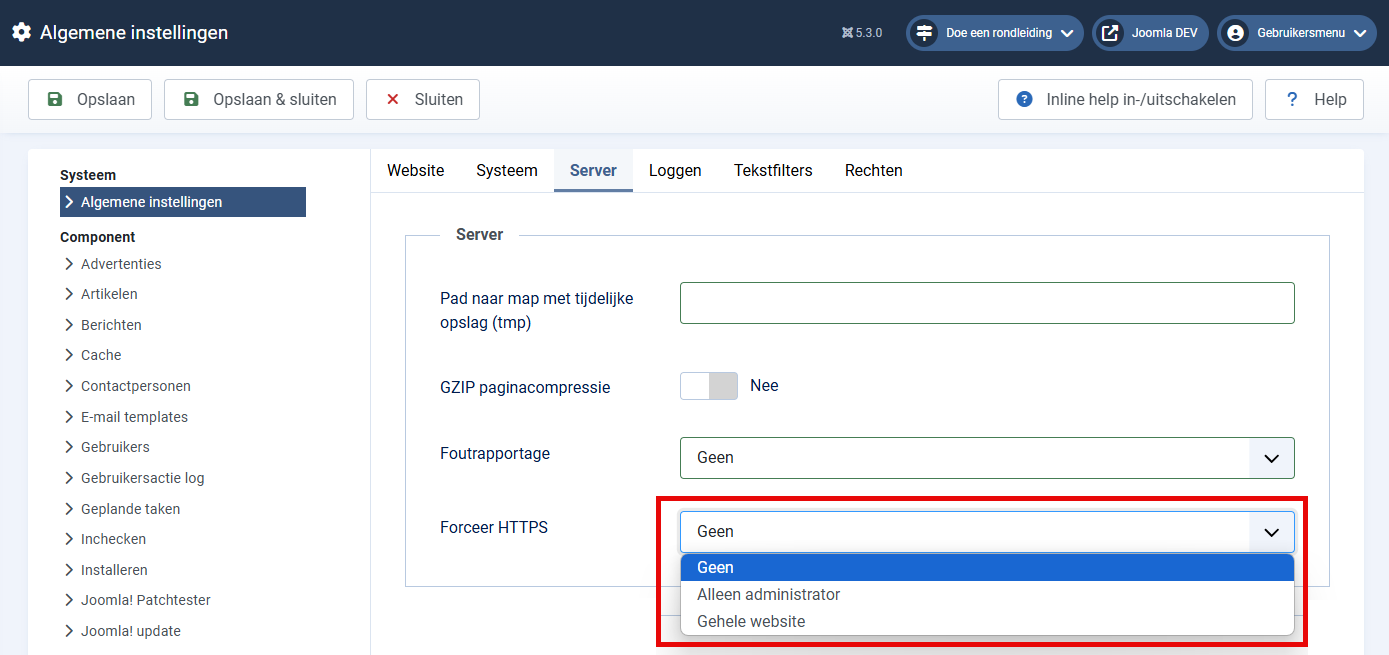
- Find the option Force SSL (Force HTTPS). You have three choices:
None: SSL is off (not recommended).
Administrator only: Only the backend is secured.
Entire website: Both visitor and administrator always use HTTPS.
5. Select Entire website.
6. Click Save.
> Warning: If you force SSL while the certificate is not yet working on the server, you lock yourself out. Can't log in anymore? Then open the `configuration.php` file via FTP and change the line `public $force_ssl = '2';` to `public $force_ssl = '0';`.
Troubleshooting: The lock is not green/close?
Have you enabled SSL, but the browser indicates "Not fully secured" or you don't see a lock? Then you are suffering from Mixed Content.
This means that the page is loaded via HTTPS, but there are images, scripts or style sheets in the code that are still loaded via HTTP (e.g. <img src="http://website.nl/plaatje.jpg">).
Solution:
Use an extension such as DB Replacer or Better Search Replace to change all references in your database from http:// to https://
Check settings of specific components or templates; sometimes logos or links are "hardcoded" with http there.
Don't forget:
Adjust external services as well. Think of Google Analytics, Google Search Console and payment providers (such as Mollie or PayPal); specify there that your website now runs on `https`.
If you experience problems with the SSL Certificate, use the SSL Certificate Tools
