
Joomla Configuration

Hiding a menu item

In some cases, it is desirable to link to another article. This is not always possible without affecting the modules on that page. This is because the modules are linked to a menu item and if the article being linked to is not a menu item, the modules will not be displayed properly. In this case, it was possible in Joomla to create a hidden menu , but from Joomla 3.5 onwards, this can be done a little easier.

Creating a hidden menu item

Since Joomla 3.5, you can show or hide any menu item.

To do this, create a menu item as you always did, only then go to the"Link type" tab.
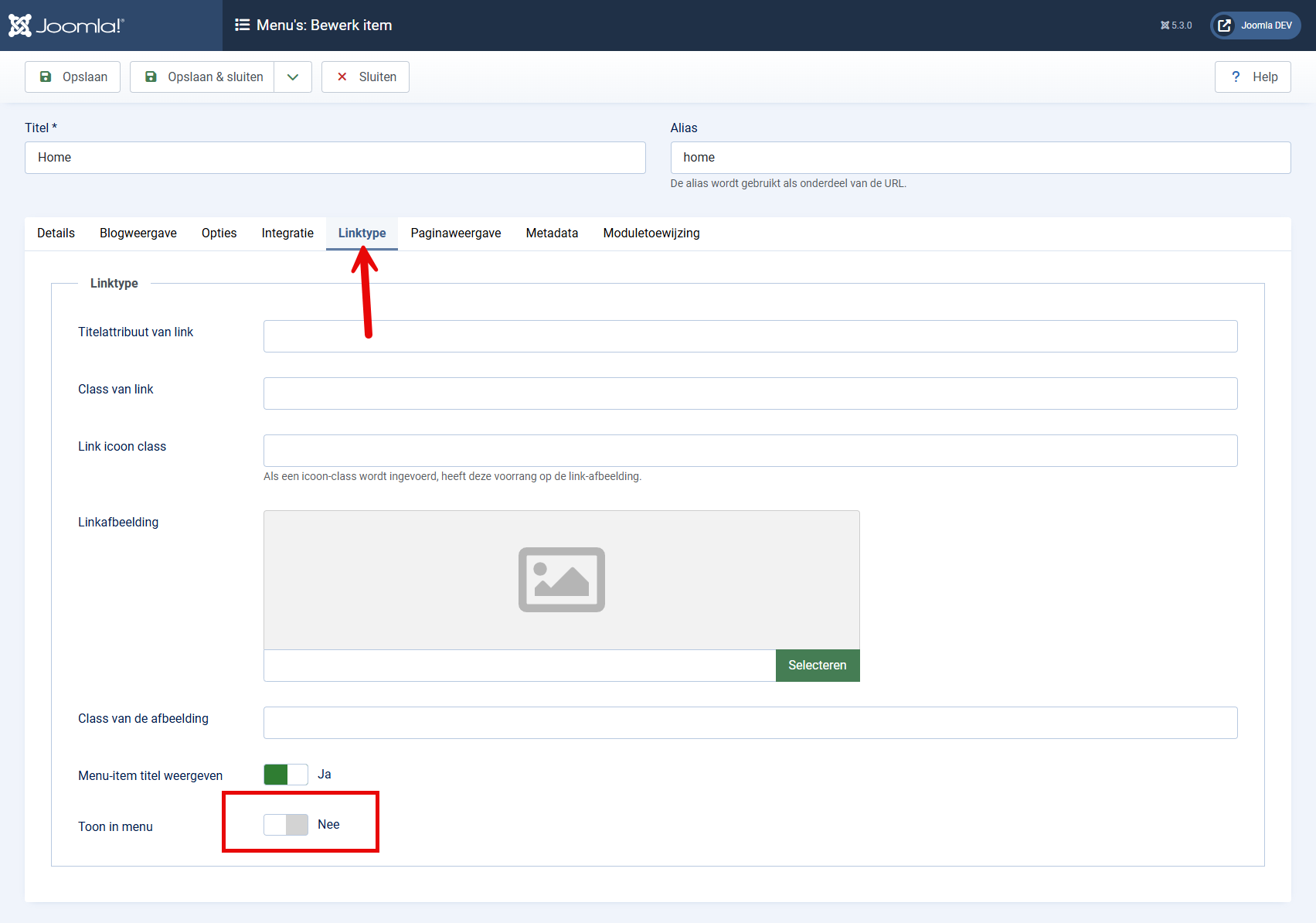
menu item verbergen

In this tab you see the option"Show in menu", which is set to "YES" by default. If you set it to"NO", the menu item will no longer be visible in your menu.

The menu item still exists and is also published, it has just become invisible. You can now use the article editor (such as JCE Editor) to create a link to this menu item and also link all modules you want to show with this article to this page. If you manually create a link to the page then you must use the Alias in the URL, so in this case it's a link to www.mijnwebsite.nl/verborgen.

Remember that your menu item does show up in your sitemap and will also be indexed by Google. If you don't want this page to show up in search results, go to the "Metadata" tab and set the Robots option to "No index, No follow".

I would be happy to assist you in optimizing your menu structure and internal links to ensure that everything continues to function as intended.
Jeroen Moolenschot

About Jeroen

I have been working with the Joomla! CMS since 2006. Besides building and maintaining Joomla! websites and webshops, I am also familiar with search engine optimization (SEO), Joomla hosting and developing templates and extensions. Furthermore, I am a frequent visitor and speaker at JoomlaDays and various Joomla user groups.

I am committed to the Joomla! community as a member of the Extensions Directory team and the organization of Joomla user group Breda and JoomlaDagen Netherlands. In short: Are you looking for a Joomla Specialist, you should contact me!

Popular articles

Redirecting an old URL to a new URL in Joomla

Sometimes, some of your valuable links may lead to the 404 page. This usually happens when the alia…

Disable Joomla Update Notification email

Joomla has a plugin by default that emails every administrator with superuser privileges when a Joo…

Blocking an IP address on your Joomla website

It is, of course, possible to deny a particular IP address access to your Joomla website. Reason…

Preventing spam in Joomla with Captcha

Nothing is more annoying than a mailbox full of spam responses or fake requests via your contact fo…

Code is automatically deleted

After adding custom HTML code in an article or module, you might find that the HTML code has been r…

The "Logout" menu item

If your visitors have the option of logging in to your Joomla website, chances are you are using th…